MiniRobotLanguage (MRL)
PDC.Create Desktop with Explorer
Used to create a private Desktop (Hidden Desktop)
Intention
This Command will create e a new "private Desktop" (PD).
The creation of the Private Desktop is rather fast, while the loading of the Explorer will take some time.
This can continue even after the Command was ready.
Even though an Explorer was loaded on the "Private Desktop", it may not work in all parts as expected.
That's due to the fact that the Explorer itself is not prepared to work with PD's.
For more Details on "Private Desktops" (PD) see here: PDC - General Information.
To just create a PD you can simply type:
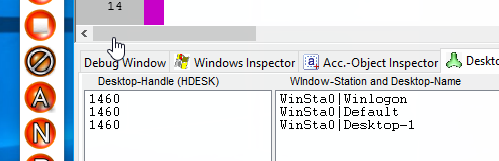
PDC.Create Desktop with Explorer|Desktop-1
The result will be visible in the SPR-Editor's "Desktop Inspector".
Syntax:
PDC.Create Desktop with Explorer|P1
PDC.CDE|P1
Parameter Explanation:
P1 - The name of the new private Desktop.
Example:
'----------------------------------------
'
PDC.Create Desktop with Explorer|New Desktop
END.
Remarks:
This feature is currently experimental, therefore not all features of the SPR and the SPR-Editor may work as expected on private Desktops. To create a private Desktop, the Executable needs Admin-Rights.
Limitations:
This Feature may require Windows Vista or higher.
See also:
• 2.1.5 '#HID: - Hidden Desktop Scripts
• ICD./NCD. - If/Not Current Desktop
• IPD./NPD. - If/Not Private Desktop
• PDC.Create Desktop no Explorer
• PDC.Get current Desktop Name
• 2.1.4 '#EXV: - Execute on System Desktop
• HDC. - Hidden Desktop Control
• #ONCE / # OEND - Multiple Include Protection
• 2.1.8 '#INC: - Include Files and Folders into the Executable