MiniRobotLanguage (MRL)
STR.TEXT TO MIME
String Commands
Intention
To transfer binary data in written form, all "non-printable characters" like ASCII 12,13 and others need to be encoded in printable Form.
For this generally the MIME-Format can be used. The MIME-Format is also called "BASE 64" Format.
STR.TEXT TO MIME will convert the text or binary data that is contained in a variable, to the MIME-Format. The result will be in the same variable or in a Target variable if given.
The Command itself looks like this:
' $$SRC - Binary or Text-Data to convert to MIME
' $$TAR - MIME-Format Result
STR.TEXT TO MIME|$$SRC|$$TAR
The Result looks somehow like you see below.
Its a Screenshot from the Examples below (see Examples-Section).

As you can see the MIME encoded Binary is 360 bytes long, while the original size was 270 bytes. That is generally 134% the size of the original size.
There is an additional third parameter, that allows for a maximum line-length, after which a $crlf$ will be inserted (newline). If this parameter is zero, no $crlf$ will be inserted. Otherwise, it may look like this:
STR.TEXT TO MIME|$$SRC|$$TAR|24
or
STR.TEXT TO MIME|$$SRC||24
The Result now contains a linefeed ($crlf$) after each line with the given number of characters.
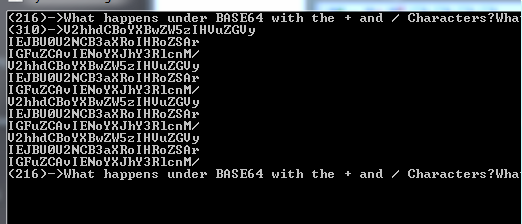
Now the Ratio is 144% because of the additional Newlines that have been added.
They will be ignored when decoding MIME back to the original Text or Binary.
This is the reverse Command to STR.MIME TO TEXT.
Syntax
STR.TEXT TO MIME|P1[|P2][|P3]
Parameter Explanation
P1 - source variable. If P2 is missing then its also the destination variable
P2 - (optional) destination variable. If omitted the result is placed in the variable in P1.
P3 - (optional) numerical parameter. If given, a $crlf$ (Newline) is placed after the given number of characters.
Example
'*************************************
' STR.MIME TO TEXT and
' STR.TEXT TO MIME
' using one Input-Output-Variable
'*************************************
$$SRC=What happens under BASE64 with the + and / Characters?
$$SRC=$$SRC$$SRC$$SRC$$SRC$$SRC$$SRC$$SRC$$SRC$$SRC$$SRC$$SRC$$SRC
LEN.$$SRC|$$LEN
PRT.($$LEN)->$$SRC
STR.TEXT TO MIME|$$SRC
LEN.$$SRC|$$LEN
PRT.($$LEN)->$$SRC
STR.MIME TO TEXT|$$SRC
LEN.$$SRC|$$LEN
PRT.($$LEN)->$$SRC
$$SRC=What happens under BASE64 with the + and / Characters?
$$SRC=$$SRC$$SRC$$SRC$$SRC$$SRC$$SRC$$SRC$$SRC$$SRC$$SRC$$SRC$$SRC
LEN.$$SRC|$$LEN
PRT.($$LEN)->$$SRC
STR.TEXT TO MIME|$$SRC||64
LEN.$$SRC|$$LEN
PRT.($$LEN)->$$SRC
STR.MIME TO TEXT|$$SRC
LEN.$$SRC|$$LEN
PRT.($$LEN)->$$SRC
MBX.It works!
ENR.
'*************************************
' STR.MIME TO TEXT and
' STR.TEXT TO MIME
' with a 40 Characters per Line Output
'*************************************
$$SRC=What happens under BASE64 with the + and / Characters?
$$SRC=$$SRC$$SRC$$SRC$$SRC$$SRC$$SRC$$SRC$$SRC$$SRC$$SRC$$SRC$$SRC
STR.TEXT TO MIME|$$SRC|$$ERG|40
LEN.$$ERG|$$LEN
PRT.($$LEN)->$$ERG
$$SRC=$$ERG
STR.MIME TO TEXT|$$SRC|$$ERG
LEN.$$ERG|$$LEN
PRT.($$LEN)->$$ERG
MBX.It works!
ENR.
'*************************************
' STR.MIME TO TEXT and
' STR.TEXT TO MIME
' using one Variable only
' with a 40 Characters per Line Output
'*************************************
'
$$SRC=What happens under BASE64 with the + and / Characters?
$$SRC=$$SRC$$SRC$$SRC$$SRC$$SRC$$SRC$$SRC$$SRC$$SRC$$SRC$$SRC$$SRC
LEN.$$SRC|$$LEN
PRT.($$LEN)->$$SRC
STR.TEXT TO MIME|$$SRC
LEN.$$SRC|$$LEN
PRT.($$LEN)->$$SRC
STR.MIME TO TEXT|$$SRC
LEN.$$SRC|$$LEN
PRT.($$LEN)->$$SRC
MBX.It works!
Remarks
-
Limitations:
-
See also:
• 1.5.2 Working with Text-Strings
• VAR. - Variable Set Value/Clear
• IVS. / NVS. - If-Variable-String
• SBD. - String between Delimiter
• SBM. - String between Delimiter-Multiple