MiniRobotLanguage (MRL)
UTA. Command
Unicode to ANSI
Intention
This Command returns the Unicode-Text in P1 to 1-Byte ANSI Format.
' Use it with 1 or 2 Parameters
$$TXT=ABCDEFGHIJK
PRT.$$TXT|h
ATU.$$TXT
PRT.$$TXT|h
UTA.$$TXT
PRT.$$TXT|h
MBX. Ready
Syntax
UTA.[P1][|P2]
Parameter Explanation
P1 - Input String in Variable. If P2 is omitted the result will also be placed in P1.
P2 - (optional) Variable to return the ANSI-Result.
Example
' Or use it like this
$$TXT=ABCDEFGHIJK
ATU.$$TXT|$$TAR
PRT.$$TXT|h
PRT.$$TAR|h
UTA.$$TAR|$$TXT
PRT.$$TXT|h
MBX. Ready
ENR.
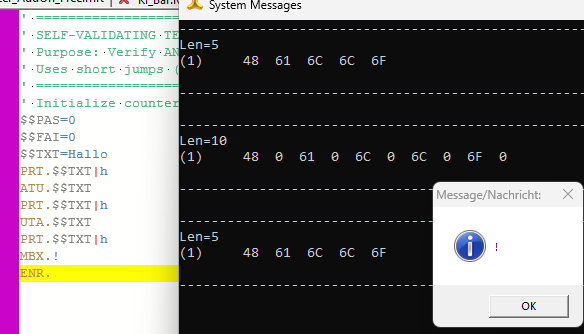
' Conversion Test
'
$$TXT=Hallo
PRT.$$TXT|h
ATU.$$TXT
PRT.$$TXT|h
UTA.$$TXT
PRT.$$TXT|h
MBX.!
ENR.
Remarks
This Command is the counterpart of the ATU. - Command.
Limitations:
The theoretical maximum length of a variable /text / string is 2 GB. In real life, it is less, because variables need string memory and that must not be fragmented. After all the maximum size of a variable on your system depends on the amount of RAM that is available, and it depends on how fragmented your memory is. Under normal circumstances several hundred MegaBytes should be no problem.
See also:
• 1.5.2 Working with Text-Strings
• VAR. - Variable Set Value/Clear
• IVS. / NVS. - If-Variable-String
• SBD. - String between Delimiter
• SBM. - String between Delimiter-Multiple