MiniRobotLanguage (MRL)
PIS. Command
PlugInSend
Intention
The PIS-Command sends Commands to a PlugIn.
Using PIS. you can
• change the Text on the Buttons,
• attach a picture to the buttons,
• resize the Plugin or
• attach the PlugIn to any window
• and much more.
You can also decide whether the PlugIn Buttons should be arranged vertical or horizontal.
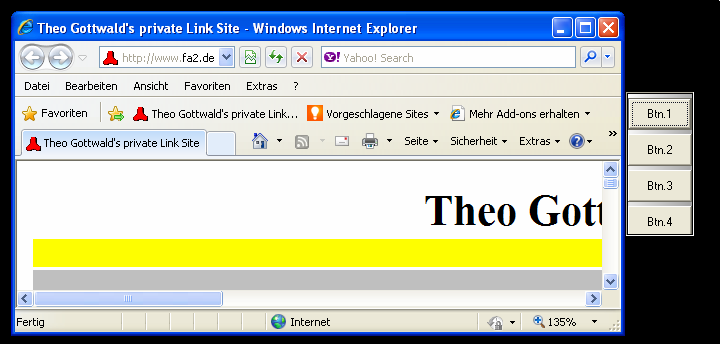
This is a vertical PlugIn 01. It will be arranged vertical, using:
' Plugin vertical
PIS.$$REA|sv
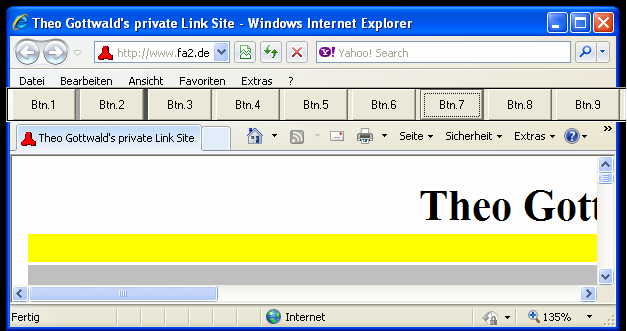
And in the picture below you see a horizontal PlugIn.
The code for a horinzontal PlugIn is:
' Plugin horizontal
PIS.$$REA|sh
Important note:
Select the arrangement (horizontal/vertical) immediately after the PlugIn Launch.
Then add all needed Buttons. If you need to change the arrangement later, reduce the button-number to 1 and then after changing, add additional buttons.
Syntax
PIS.P1|P2[|P3...Px]
Parameter Explanation
P1 - variable which contains the PlugIn Index-No.
P2 - Command which shall be sent to the PlugIn
All Commands are specific for the type of PlugIn used.
Following PlugInCommands are supported by the actual PlugIn_01.exe:
Quick reference (what each command does)
attach/detach: dock plugin to a target window or undock it.
sbt: set button text (single/all, with %n and %c placeholders).
sto/uto: set, update, or remove button tooltips.
stc: set tooltip background/text color.
sp: assign button image/icon/cursor (single/all).
sbhvs/sbhs/sbvs: set button sizes. sbhd/sbvd: set button spacing.
show/hide, sh/sv: visibility and horizontal/vertical bar orientation.
sbn: set number of visible buttons. scf: correction factors for docking geometry.
sbfc/sbbc/str: button colors and transparency.
be/bd: enable or disable buttons.
sas/saa/sasnd/saand: assign synchronous/asynchronous autorun actions.
mmf: filter mouse-triggered events. stm: set topmost behavior. swa: foreground-class alert. sah: auto-hide.
"at","attach"
' $$I06 attach the Plugin to the window,
' 2 - right side, 1 - on Top
' §§I05
' 1 - Left side outside; 2 - Right side outside;
' 3 - left side inside, 4 - right side inside;
' 5 - left side inside bündig, 6 - right side inside bündig
'
PIS.$$PIN|attach|$$ULT|$$I05|$$I06
"dt","detach"
PIS.$$PIN|detach
"sbt","setbuttontext"
PIS.$$PIN|sbt|$$NUM|$$TXT
"sto","settooltip"
PIS.$$PIN|sto|$$NUM|$$TXT
PIS.$$PIN|sto|all|$$TXT
PIS.$$PIN|sto|3|Start%cSecond line
PIS.$$PIN|sto|3|notext
' "notext" removes the tooltip. %n can be used with "all", %c inserts CRLF.
"uto","updatetooltip"
PIS.$$PIN|uto|$$NUM|$$TXT
PIS.$$PIN|uto|all|$$TXT
PIS.$$PIN|uto|5|Updated tooltip
PIS.$$PIN|uto|5|notext
' Alias for tooltip update/remove behavior.
"stc","settooltipcolor"
PIS.$$PIN|stc|$$BGCOLOR|$$TEXTCOLOR
PIS.$$PIN|stc|default|default
PIS.$$PIN|stc|16777190|0
' Supported keywords: default, infobk, infotext
"gh","gethandle" ' Handle is returned on TOS
PIS.$$PIN|gh
"sp","setpicture"
PIS.$$PIN|sp|1|24_about.bmp
PIS.$$PIN|sp|2|24_about.ico
PIS.$$PIN|sp|19|24_about.cur
' This will set all pictures to
' "24_about_1.cur" til "24_about_20.cur"
PIS.$$PIN|sp|all|24_about_%n.cur
"sbhvs","setbuttonshvsize"
PIS.$$PIN|sbhvs|$$HSI|$$VSI
"sbvs","setbuttonsvsize"
PIS.$$PIN|sbvs|$$VSI
"sbvd","setbuttonsvdist"
PIS.$$PIN|sbhd|$$HDI
"sbhs","setbuttonshsize"
PIS.$$PIN|sbhs|$$HSI
"sbhd","setbuttonshdist"
PIS.$$PIN|sbhd|$$HDI
"sho","show"
PIS.$$PIN|sho
"hid","hide"
PIS.$$PIN|hide
"sh","sethorizontal"
PIS.$$PIN|sh
"sv","setvertical"
PIS.$$PIN|sv
"scf","setcorrectionfactor"
PIS.$$PIN|scf|$$I02|0|$$I04
"sbn","setbuttonnumber"
PIS.$$PIN|sbn|6
"sbfc","setbuttonforecolor"
PIS.$$PIN|sbfc|1|&hff00ff
"sbbc","setbuttonbackcolor"
PIS.$$PIN|sbbc|1|&h0ff00
"str","settransparent"
PIS.$$PIN|str|ALL|1
"bd","buttondisable"
PIS.$$PIN|bd|all
"be","buttonenable"
PIS.$$PIN|be|2
' Parameters can be 1 or 0
' the PlugIn will be on Top or not
"stm","settopmost"
PIS.$$PIN|stm|1
"sas","setautorunsynchron"
PIS.$$PIN|sas|?pfad\myprog.exe
"saa","setautorunasynchron"
PIS.$$PIN|saa||?pfad\myprog.exe
"sasnd","setautorunsynchronnodisable"
PIS.$$PIN|sasnd|?pfad\myprog.exe
"saand","setautorunasynchronnodisable"
PIS.$$PIN|saand|?pfad\myprog.exe
"mmf","mousemesagefilter","mousemessagefilter"
PIS.$$PIN|mmf|all|1
0 - alle Messages,
1 - Message nicht bei Autorun,
2 - keine dblclick,
4 - keine singleklick,
8 - keine mouseover,
16 - keine Mouseleftmessages
"stm","settopmost"
PIS.$$PIN|stm|1
' Can be 0 or 1 to select between Top- and TOPMOST
"swa","setwindowalert"
PIS.$$PIN|swa|1|ieframe
' Can be 0 or 1 to enable or disable the Alerting-Message when another window with the given classname appears in the foreground.
"sah","setautohide"
PIS.$$PIN|sah|1
' Can be 0 or 1 to select between hide or not-hide PlugIn Buttons automatically when the Host-window dissapears. Autohide is ON by default.
P3 - Parameters will be sent to the Plugin, they depend on the Command P2.
Example
'*********************************
' Vertical Plugin-Sample
'*********************************
'VAR.$$PIC=24_about.bmp
EXO.iexplore
PIL.$$REA|01
' use any window to attach the plugin
STW.t|explorer
' Store the window handle in a variable
HTV.$$ULT
PIS.$$REA|sbhd|4
' Plugin vertikal anordnen
PIS.$$REA|sv
' Make the PlugIn visible
PIS.$$REA|show
' attach the Plugin to the window
PIS.$$REA|attach|$$ULT|0|0
' Set text on Button 1
FOR.$$CNT|1|20
PIS.$$REA|sBt|$$CNT|Btn.$$CNT
NEX.
' Show a picture on Button 2
'PIS.$$REA|sp|2|$$PIC
' Set Distance between buttons (vertical in Points)
PIS.$$REA|sbvd|4
PIS.$$REA|sbn|1
' This double Loop will Show more or less buttons
FOR.$$LOA|1|2
FOR.$$LOP|1|20
PRT.->$$LOP
PIS.$$REA|sbn|$$LOP
PAU..2
NEX.
NEX.
PAU.2
:enz
END.
Remarks
You can use up to 5 Plugins at the same time.
Just start them, each will get another Index.
To communicate with each PlugIn, you just give the PlugIn-Index to each Command.
Button-Colors and transparency:
Please note that if you set Buttons transparent, that they can not have a background-color at the same time.
To set multiple Buttontext at once you can use:
PIS.$$PIN|sbt|all|Button %n
The "%n" is replaced with the number of that button.
The "all" and %n-scheme will also work with most other Commands, where it makes sense.
Limitations:-
-
See also:
•