MiniRobotLanguage (MRL)
TXT.tra
TXT.Translate_Chars
Translate Characters in the TXT.-internal Buffer
Intention
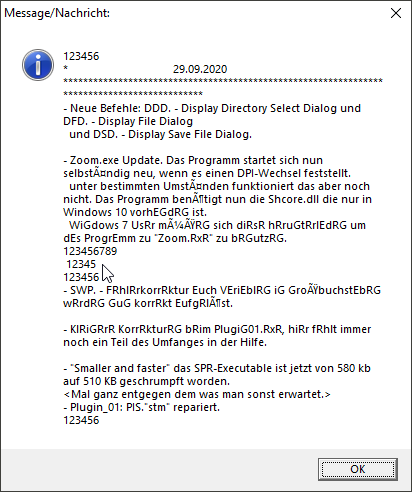
Using TXT.tra there is a 1:1 relation between the characters in $$OLD (P1) and the characters in $$NEW (P2).
So if a character in $$OLD is found it is replaced with the corresponding Character in $$NEW.
Therefore both - $$OLD and $$NEW - MUST have the same lenght, else there will be no changes and you will get the Timeout Flag set.
'Translate_Chars
' a -> E
' n -> G
' e -> R
' Looks like this:
TXT.tra|ane|EGR|520|800
VAR.$$LAA=?path\..\Pics\Test.txt
TXT.ltf|$$LAA|$$RES
' This example shows all features of TXT.tra
TXT.tra|ane|EGR|520|800
' You can also see that the Translate_Chars starts a Position 520, as specified and ends at Position 800.
' So the start of the text is unchanged and also the end.
Syntax
TXT.tra|P1|P2[|P3][|P4]
TXT.Translate_Chars|P1|P2[|P3][|P4]
Parameter Explanation
P1 - (Input) Variable with Characters to translate. Using TXT.tra each occurrence of each character in P1 will be replaced with the corresponding character in P2.
because of that, P1 and P2 must be the same length. There is a one-to-one correspondence between their characters.
P2 - (Input) Variable with the String that shall replace the characters in P1.
P3 - (optional, numeric) Variable with a Byte-Position in the TXT.-Buffer, if given the Translate_Chars will start at that Position.
If omitted the Text is been searched and replaced from Position 1.
P4 - (optional, numeric) Variable with a Byte-Position in the TXT.-Buffer, if given the Translate_Chars will end at that Position.
If omitted the complete Text is been searched and replaced to the end.
Example
'*****************************************************
' EXAMPLE 1:
'*****************************************************
VAR.$$LAA=?path\..\Pics\Test.txt
TXT.ltf|$$LAA|$$RES
VAN.$$STA=100
'Translate_Chars all "a" with "e" and "s" with "f" in internal TXT.-Buffer starting from Byte-Position 100
VAR.$$OLD=as
VAR.$$NEW=ef
TXT.rep|$$OLD|$$NEW|$$STA
ENR.
Remarks
-
Limitations:
-
See also:
• IEF. / NEF. - If - exist - File