MiniRobotLanguage (MRL)
BIT.8to16
concatenate 2 Bytes to 16 Bit Word
Intention
Concatenate two 8-Bit variables into one 16-Bit Variable.
The parameters P1 and P2 can be given as value or as "binary".
The result is a 32-bit variable. You can choose whether P3 will be "as value" or "as binary". If you do not specify whether "b" or "v" the result will take the format of P1.
Please see ! Smart Package Robot 's BIT. - Operations
You can define for all 3 Parameters if they should be in "Value" or "Binary Format.
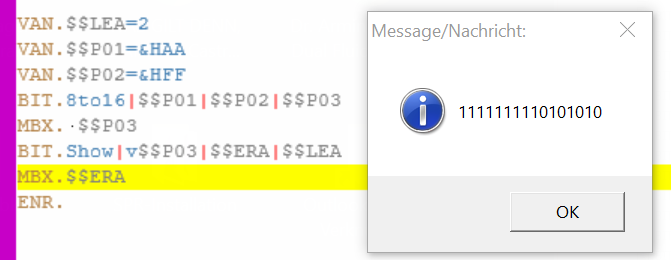
VAN.$$LEA=2
VAN.$$P01=&HAA
VAN.$$P02=&HFF
BIT.8to16|$$P01|$$P02|$$P03
MBX. $$P03
BIT.Show|v$$P03|$$ERA|$$LEA
MBX.$$ERA
ENR.
Syntax
BIT.8to16|[b/v]P1|[b/v]P2[|[b/v]P3]
Parameter Explanation
P1 - Variable containing a 8 bit numeric value.
You can define with a prefix of "v" for value and "b" for "binary" which format the value is.
If the prefix is omitted, "v" is the default setting for P1.
P2 - Variable containing a 8 bit numeric value.
You can define with a prefix of "v" for value and "b" for "binary" which format the value is.
If the prefix is omitted, "v" is the default setting for P1.
P3 - optional,Variable for 16 bit result. If you use "-" the result is placed on the TOS. Also here you can specify [b/v] for the format of the result.
You can choose whether P3 will be "as value" or "as binary". If you do not specify whether "b" or "v" the result will take the format of P1.
Example
'*****************************************************
' EXAMPLE 1:
'*****************************************************
VAN.$$LEA=2
VAN.$$P01=&HAA
VAN.$$P02=&HFF
BIT.8to16|$$P01|$$P02|$$P03
MBX. $$P03
BIT.Show|v$$P03|$$ERA|$$LEA
MBX.$$ERA
ENR.END.
Remarks
-
Limitations:
-
See also:
•3.5 Hexadezimal, Decimal and Binary and more
•VTH. - Variable to Hexadecimal
•CAL. - mathematical CALculation
•VAR. - Variable Set Value/Clear
•! Smart Package Robot 's BIT. - Operations
•BIT.16to8 - Split 1 Word into 2 Bytes
•BIT.16to32 - concatenate 2 Words to 32 Bit DWord
•BIT.32to16 - Split 1 DWord into 2 Words
•BIT.8to16 - concatenate 2 Bytes to 16 Bit Word
•BIT.AND - Use logical AND with Bits
•BIT.LShift - Shift Bits to Left, insert 0
•BIT.NOT - Use logical NOT with Bits
•BIT.OR - Use logical OR with Bits
•BIT.RotateLeft - Rotate Bits Left
•BIT.RotateRight - Rotate Bits Right
•BIT.RShift - Shift Bits to Right, insert 0
•BIT.Show - Show Bits in Binary-Numbers
•BIT.Store - Set Bit to 1 or 0
•BIT.ToBin - change Parameter to Binary-Format
•BIT.ToVal - change Parameter to Value-Format
•BIT.XOR - Use logical XOR with Bits
•BIT.Get - check if Bit is set
• CAL. - mathematical CALculation
• VAR. - Variable Set Value/Clear