MiniRobotLanguage (MRL)
BIT.NOT - Use logical NOT with Bits
Invert Bits
Intention
NOT generally inverts bit, it makes a 0 to a 1 and makes a 1 to a 0.
The parameters P1 can be given as value or as "binary".
The result is in P2 which is the invers of P1.
Please see ! Smart Package Robot 's BIT. - Operations
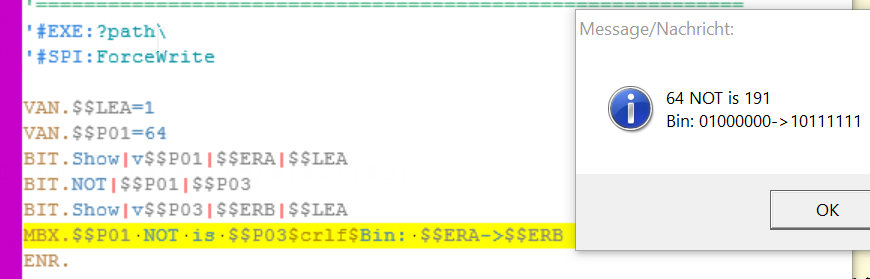
VAN.$$LEA=1
VAN.$$P01=64
BIT.Show|v$$P01|$$ERA|$$LEA
BIT.NOT|$$P01|$$P03
BIT.Show|v$$P03|$$ERB|$$LEA
MBX.$$P01 NOT is $$P03$crlf$Bin: $$ERA->$$ERB
ENR.
Syntax
BIT.NOT|[b/v]P1|[b/v]P2[|P3]
Parameter Explanation
P1 - Variable containing a value or binary number. For example take the Number "9". It can be an ASC-Code "9" or the numeric number "9".
You can define this with a prefix of "v" for value and "b" for "binary". If the prefix is omitted, "v" is the default setting for P1.
P2 - P2 - Variable for result or"-". If P2 is not a variable, the result is placed on the TOS.
You can define this with a prefix of "v" for value and "b" for "binary". If the prefix is omitted, "v" is the default setting for P2.
Also here you can specify [b/v] for the format of the result. If you do not specify anything the result is "value"-Format.
P3 - optional, can be 1,2 or 4. Number of Bytes that are used internally. The number of Bits is the number of Bytes times 8.
1 - 8 Bits
2 - 16 Bits
4 - 32 Bits
Do not use the "8" Option. See Limitations below.
Example
'*****************************************************
' EXAMPLE 1:
'*****************************************************
VAN.$$LEA=1
VAN.$$P01=64
BIT.Show|v$$P01|$$ERA|$$LEA
BIT.NOT|$$P01|$$P03
BIT.Show|v$$P03|$$ERB|$$LEA
MBX.$$P01 NOT is $$P03$crlf$Bin: $$ERA->$$ERB
ENR.
Remarks
-
Limitations:
When using the "|8" Parameter, the lower 4 bits are possibly wrong. This is not a bug its due to the way variables are stored internally.
Therefore we recommend to not use this option.
See also:
•3.5 Hexadezimal, Decimal and Binary and more
•VTH. - Variable to Hexadecimal
•CAL. - mathematical CALculation
•VAR. - Variable Set Value/Clear
•! Smart Package Robot 's BIT. - Operations
•BIT.16to8 - Split 1 Word into 2 Bytes
•BIT.16to32 - concatenate 2 Words to 32 Bit DWord
•BIT.32to16 - Split 1 DWord into 2 Words
•BIT.8to16 - concatenate 2 Bytes to 16 Bit Word
•BIT.AND - Use logical AND with Bits
•BIT.LShift - Shift Bits to Left, insert 0
•BIT.NOT - Use logical NOT with Bits
•BIT.OR - Use logical OR with Bits
•BIT.RotateLeft - Rotate Bits Left
•BIT.RotateRight - Rotate Bits Right
•BIT.RShift - Shift Bits to Right, insert 0
•BIT.Show - Show Bits in Binary-Numbers
•BIT.Store - Set Bit to 1 or 0
•BIT.ToBin - change Parameter to Binary-Format
•BIT.ToVal - change Parameter to Value-Format
•BIT.XOR - Use logical XOR with Bits
•BIT.Get - check if Bit is set
• CAL. - mathematical CALculation
• VAR. - Variable Set Value/Clear